
Sales : Support :
Registered in England and Wales company # 03449181.
This website does not use cookies.
© Copyright: Conwy Valley Systems Limited 2000 - 2026
Conwy Valley Systems Limited,
West Acre, Llys Helyg, Deganwy
CONWY LL31 9BN, United Kingdom.
VAT# GB 741 5190 48
A Geoscience Wales founding member.
PETROG includes patent protected technology.




PETROG 6 Installation
To install PETROG 6 for the first time, begin by downloading these four zip files :
Create a new folder on your machine and give it a suitable name, such as Petrog6InstallationFiles.
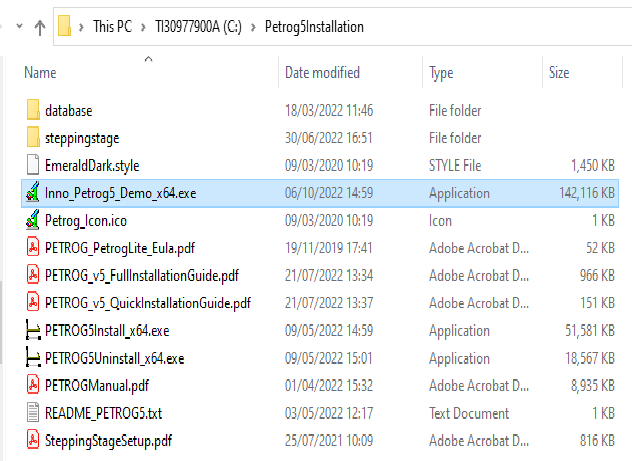
Extract the contents of these four zips to this directory, the contents of which should now resemble the following:
|
Version Change Log |
PETROG 6 installer 64 bit version (x64) |
|
installation Guide |
|
|
Database |
|
|
Stepping Stage |
|
|
PETROG 6 (Axiocam) |
|



|
PETROG 6 for Zeiss Axiocam and ICc cameras |
|

If you experience difficulties in downloading these files, please ensure your browser software has the latest updates.
Important
If you already have PETROG 6 and wish to upgrade to the latest release then go here.
If you are upgrading from an earlier version of PETROG then please see the instructions here.
Finally, follow the instructions in the installation guide, which should now be located at e.g. \Petrog6InstallationFiles\Petrog_v6_QuickInstallationGuide.pdf and \Petrog6InstallationFiles\Petrog_v6_FullInstallationGuide.pdf.
Users updating from earlier versions of PETROG should simply run PETROG6Install_x64.exe as described in the installation guide, installing both PETROG6 and PostgreSQL 17; data from an earlier version of PETROG can then be imported into PETROG6 as described in the installation guide.
| Academic and Research |
| Oil & Gas |
| Coal |
| Concrete |
| Ceramics in Archaeology |
| Cement Clinker |
| Scanned Images, Archives & AI |
| Asbestos |
| Scanned Images |
| Archives and Legacy Data |
| AI & Machine Learning |
| PETROG |
| PetrogLite |
| SteppingStage |
| PETROG Virtual Keyboard |
| PetrogScan |
| PetrogDownhole |
| Cameras |
| Additional Services |
| Features |
| Who Uses Petrog ? |
| Demonstrations |
| FAQ (PETROG) |
| Upgrade from PetrogLite |
| Enquiries |
| Custom Work Flow and Protocols |
| Data Structures |
| Data Capture & Analysis |
| Sample Scanning |
| Reporting |
| Data : Storage & Exchange |
| Area of Interest |
| Set Area of Interest |
| Compositional Analysis Methodology |
| Compositional Data |
| Textural Data |
| Qualifiers and Relationships |
| Microporosity |
| Microporosity and XRD |
| Dictionaried Lists |
| Point counting Application |
| Compositional Data Entry Image |
| Quantitative Composition Summary |
| Photo stitching |
| 'Magic Mouse' for polarised images |
| Report Document |
| Triangular Diagram |
| Compositional Plot |
| Rose Diagram |
| Kite Diagram |
| Concentric Pie Chart |
| Grain Size Analysis |
| Data Storage |
| Data Exchange |
| Touchstone |
| Where is Petrog ? |
| Testimonials |
| Replacing a point counter |
| System Requirements |
| Software |
| Gallery |
| Enquiries |
| 10 years of the SteppingStage |
| Espanol |
| PVK with PetrogLite |
| Cameras and PETROG |
| Supported Cameras |
| HDMI Cameras |
| Discontinued Cameras |
| Training |
| Downloads |
| Change log |
| FAQ (Support) |
| Known issues |
| Future |
| PETROG 6 |
| PetrogLite 6 |
| PETROG Virtual Keyboard (v6) |
| Tutorials |
| YouTube |
| Older versions |
| PETROG 6 Upgrade |
| PETROG 6 Installation |
| PETROG 6 Documentation |
| Evident from Olympus |
| GT Vision (GXCAM) |
| GT Vision (Uvcham) |
| Jenoptik |
| Lumenera |
| Nikon |
| PixeLINK |
| The Imaging Source |
| ToupTek Photonics |
| Zeiss |
| Virtual Image Camera |
| HDMI |
| No Camera |
| PetrogLite 6 Upgrade |
| PetrogLite 6 Installation |
| Documentation |
| PETROG 5 |
| PetrogLite 5 |
| PETROG Virtual Keyboard (v5) |
| PETROG 4 |
| PetrogLite 4 |
| PETROG 3 |
| PetrogLite 3 |
| PETROG 5 Upgrade |
| PETROG 5 Installation |
| Documentation |
| PetrogLite 5 Upgrade |
| PetrogLite 5 Installation |
| Documentation |
| PETROG 4 Upgrade |
| PETROG 4 Installation |
| Documentation |
| PetrogLite 4 Upgrade |
| PetrogLite 4 Installation |
| Documentation |
| PETROG 3 Upgrade |
| PETROG 3 Installation |
| Documentation |
| PetrogLite 3 Upgrade |
| PetrogLite 3 Installation |
| Documentation |
| 6.1.0 |
| 6.0.5 |
| 6.0.4 |
| 6.0.2 |
| 5.8.6 |
| Version 5 (earlier) |
| Version 4 |
| Version 3 |
| Version 2 |
| 5.8.3 |
| 5.8.2 |
| 5.7.0 |
| 5.6.0 |
| 5.5.4 |
| 5.4.0 |
| 5.3.6 |
| 5.3.1 |
| 5.3.0 |
| 5.2.0 |
| 5.1.2.0 |
| 5.1.1.0 |
| 4.8.0.0 |
| 4.7.1.0 |
| 4.6.1.0 |
| 4.5.8 |
| 4.5.6 |
| 4.5.5 |
| 4.5.0 |
| 4.4.2 |
| 4.2.2.0 |
| 4.2 |
| 4.1.0.1 |
| 4.0.2.1 |
| 4.0.0.0 |
| 3.7.1.0 |
| 3.6.1.0 |
| 3.6.0.1 |
| 3.5.3.0 |
| 3.5.1.0 |
| 3.5.0.1 |
| 3.4.0 |
| 3.3.0 |
| 3.2.2.0 |
| 3.2.1.0 |
| 3.1.9.9 |
| 3.1.9.4 |
| 3.1.9.1 |
| 3.1.9.0 |
| 3.1.8.0 |
| 3.1.6.0 |
| 3.10 |
| 3.05 |
| 3.02 |
| 3.01 |
| 2.68 |
| 2.67 |
| 2.66 |
| 2.65 |
| 2.64 |
| 2.45-2.63 |
| Windows 7 Installation |
| PETROG 64-bit |
| "Out of Resources" (2020) |
| Control Box Chip Upgrade (2009) |
| USB - Serial connection |
| News 2026 |
| News 2025 |
| News 2023-24 |
| News 2022 |
| News 2021 |
| News 2020 |
| News 2019 |
| News 2018 |
| News 2017 |
| News 2016 |
| News 2015 |
| News 2014 |
| News 2013 |
| News 2012 |
| News 2011 |
| News 2010 |
| Nikon Small World 2013 |
| Statistical Techniques |
| PETROG in Academia |
| General Articles |
| Quantitative Grain Coat Analysis |
| Point Counting |
| Trask sorting |
| Regional Support |
| Newsletter |
| Newsletter Archive |